English
You can install a new WordPress theme without having any technical knowledge. It is so easy and automated.
1. Log in to the WordPress dashboard.
2. From the Dashboard menu, go to Appearance and click on Themes.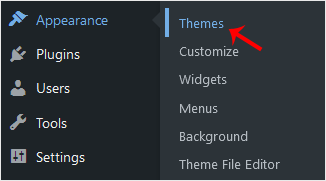
3. Click on Add New.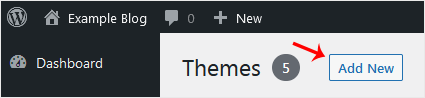
4. You can search for a theme using the search bar or browse the themes, choosing from Featured, Popular, and Latest.
5. Hover your mouse over the theme you like and choose Install.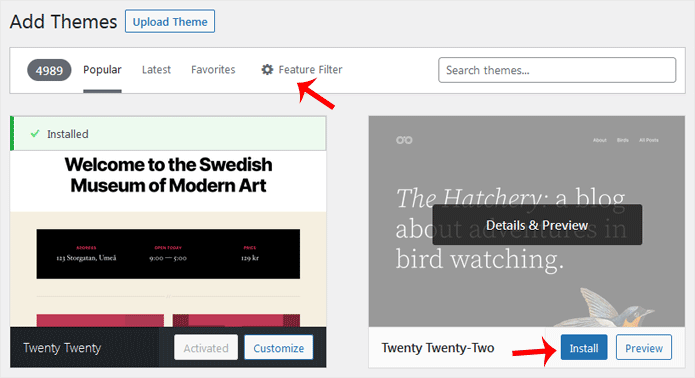
6. Click Activate on the newly installed theme.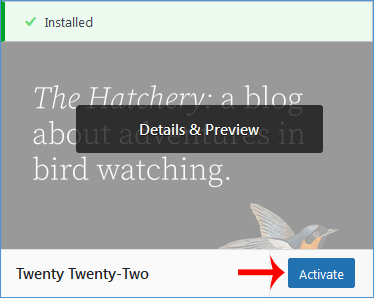
Congratulations, you have installed and activated a new theme on your blog.
How to Install a New WordPress Theme Print
- 0
Was this answer helpful?
Related Articles
How to Delete Categories in WordPress
If you want to remove the WordPress category, then follow this instruction:1. Log in to the...
How to Install a WordPress Plugin
WordPress plugins are very useful. You can easily install a plugin from the WordPress...
How to Delete a WordPress Theme
You should remove unused themes. It is considered good practice to protect your WordPress website...
How do you set the usable memory limit in WordPress?
WordPress is developed based on the PHP language, and like all PHP applications or scripts, it...
How to Access the WordPress Admin Dashboard?
WordPress is an easy to work with CMS software. To access a WordPress account, please follow...